 EN
EN

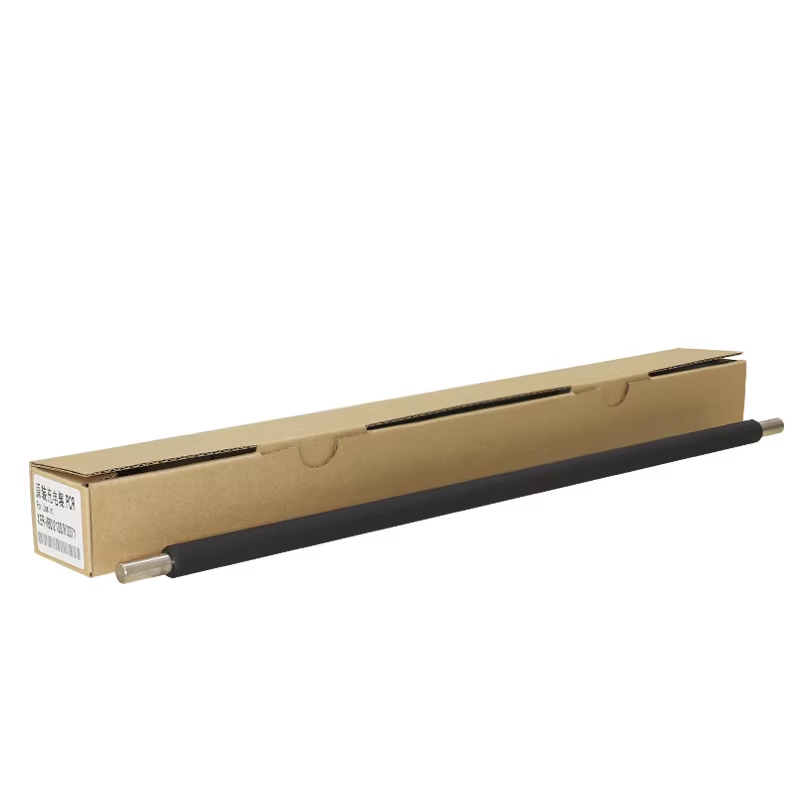
Every office environment depends on reliable printing equipment to maintain productivity and workflow efficiency. However, even the most advanced copiers and printers can experience technical difficulties that disrupt daily operations. One component that frequently causes printing problems is the primary charge roller, a critical element in laser printing technology that ensures proper electrostatic charge distribution across the photoconductor drum. Understanding the common issues associated with this component and learning effective troubleshooting methods can save businesses significant time and money while maintaining optimal print quality.
The primary charge roller serves as the foundation for successful electrophotographic printing processes. This cylindrical component applies a uniform negative charge to the photoconductor drum before laser exposure, creating the necessary electrical conditions for toner attraction and transfer. When functioning correctly, the primary charge roller ensures consistent print density, sharp text clarity, and accurate image reproduction. However, various factors can compromise its performance, leading to noticeable print quality degradation and potential equipment damage if left unaddressed.
Understanding Primary Charge Roller Functionality
Electrophotographic Process Overview
The electrophotographic printing process relies on precise electrical interactions between multiple components, with the primary charge roller playing a fundamental role in this complex system. During operation, the roller applies a consistent negative charge across the entire surface of the photoconductor drum, typically ranging from negative 600 to negative 800 volts depending on the specific printer model. This uniform charging creates a clean slate for the laser writing unit to selectively discharge areas where toner should adhere, forming the latent image that will eventually become the printed output.
Modern primary charge roller designs incorporate conductive rubber compounds and metal cores that provide optimal electrical conductivity while maintaining mechanical durability. The roller surface must maintain consistent contact with the photoconductor drum throughout its rotation cycle, ensuring uniform charge distribution without causing physical damage to either component. Any disruption in this delicate balance can result in charging inconsistencies that manifest as print quality defects ranging from light areas to complete image loss.
Component Interaction Dynamics
The primary charge roller works in conjunction with several other critical components to achieve successful printing results. The high voltage power supply provides the electrical energy necessary for charging operations, while the photoconductor drum receives and maintains the applied charge until laser exposure occurs. Additionally, the cleaning blade and waste toner collection system must function properly to prevent contamination that could interfere with the primary charge roller performance.
Environmental conditions significantly impact the effectiveness of the primary charge roller operation. Temperature and humidity variations can alter the electrical properties of the roller material, affecting its ability to apply consistent charges. Extreme conditions may cause the roller surface to become too conductive or resistive, leading to charging irregularities that compromise print quality. Understanding these interactions helps technicians identify potential issues before they become major problems requiring extensive repairs or component replacement.
Common Primary Charge Roller Problems
Surface Contamination Issues
One of the most frequent problems affecting primary charge roller performance involves surface contamination from various sources within the printing environment. Toner particles, paper dust, and other debris can accumulate on the roller surface over time, creating uneven contact with the photoconductor drum and disrupting proper charge distribution. This contamination typically manifests as vertical white or light streaks in printed documents, corresponding to areas where the contaminated roller fails to apply adequate charging.
Paper selection and storage conditions contribute significantly to contamination accumulation on the primary charge roller. Low-quality paper products often shed more fibers and particles during the printing process, while improperly stored paper may contain moisture or dust that transfers to internal printer components. Regular maintenance schedules should include roller inspection and cleaning procedures to prevent contamination buildup from reaching levels that compromise print quality or cause permanent component damage.
Electrical Degradation Symptoms
Over extended periods of use, the primary charge roller may experience electrical degradation that reduces its ability to apply consistent charges to the photoconductor drum. This degradation typically occurs gradually, making it difficult to detect until print quality problems become apparent. Early symptoms include slight variations in print density across the page width, particularly noticeable in solid color areas or large text fonts where charging inconsistencies become more visible.
Environmental factors accelerate electrical degradation in primary charge roller components. High humidity levels can cause moisture absorption in roller materials, altering their conductive properties and leading to inconsistent charging performance. Conversely, extremely dry conditions may cause static electricity buildup that interferes with normal charging operations. Temperature extremes also affect the chemical composition of roller materials, potentially causing permanent changes that require component replacement to restore optimal functionality.

Diagnostic Procedures and Troubleshooting Methods
Visual Inspection Techniques
Effective troubleshooting begins with thorough visual inspection of the primary charge roller and surrounding components. Remove the toner cartridge according to manufacturer instructions and carefully examine the roller surface for signs of wear, contamination, or physical damage. Look for areas where the roller surface appears glazed, scratched, or discolored, as these conditions indicate potential charging problems that require immediate attention.
Document any visible defects using digital photography to track problem progression over time and communicate findings with technical support personnel if necessary. Pay particular attention to the roller ends where mechanical stress concentrations may cause premature wear or cracking. Additionally, inspect the surrounding area for toner spills, paper fragments, or foreign objects that could interfere with roller operation or indicate other system problems requiring concurrent repair efforts.
Electrical Testing Procedures
Advanced diagnostic procedures involve electrical testing to verify proper primary charge roller functionality and identify specific performance deficiencies. Use a digital multimeter to measure resistance between the roller core and ground connection, comparing results with manufacturer specifications to determine if electrical properties remain within acceptable ranges. Resistance measurements outside specified parameters indicate internal component degradation requiring roller replacement.
High voltage testing requires specialized equipment and safety precautions due to the dangerous electrical levels involved in charging operations. Qualified technicians can measure actual charging voltages applied to the photoconductor drum and compare these values with factory specifications. Voltage variations exceeding acceptable tolerances indicate problems with either the primary charge roller, high voltage power supply, or associated wiring connections that must be addressed to restore proper printing performance.
Effective Repair and Maintenance Solutions
Cleaning and Restoration Methods
Proper cleaning techniques can restore primary charge roller functionality when contamination represents the primary cause of printing problems. Begin by disconnecting power to the printing device and allowing internal components to reach room temperature before attempting any maintenance procedures. Remove the toner cartridge and locate the primary charge roller, taking care to avoid touching the roller surface with bare hands as skin oils can cause permanent damage.
Use lint-free cloths dampened with isopropyl alcohol to gently clean the roller surface, rotating the component slowly to ensure complete coverage of all areas. Avoid applying excessive pressure that could damage the roller coating or cause surface deformation. Allow the alcohol to evaporate completely before reassembling the printer and conducting test prints to verify improvement in print quality. Document cleaning procedures and results to establish effective maintenance schedules for future reference.
Component Replacement Strategies
When cleaning procedures fail to resolve primary charge roller problems, component replacement becomes necessary to restore optimal printing performance. Source replacement parts from authorized distributors or original equipment manufacturers to ensure compatibility and reliability. Generic or aftermarket rollers may appear cost-effective but often lack the precise specifications required for consistent performance in demanding office environments.
Installation procedures vary by printer model, but generally require careful attention to alignment and positioning to prevent damage to surrounding components. Follow manufacturer torque specifications for mounting hardware and verify proper electrical connections before reassembling the device. Conduct comprehensive test prints using various document types and print settings to confirm that replacement roller installation successfully resolves previously identified problems without introducing new issues.
Preventive Maintenance Best Practices
Environmental Control Measures
Maintaining optimal environmental conditions represents one of the most effective methods for extending primary charge roller service life and preventing premature failure. Install humidification systems in printing areas to maintain relative humidity levels between 45 and 55 percent, reducing static electricity buildup while preventing excessive moisture absorption in roller materials. Temperature control systems should maintain consistent conditions between 68 and 75 degrees Fahrenheit to minimize thermal stress on electrical components.
Air filtration systems help reduce airborne contaminants that can accumulate on primary charge roller surfaces over time. High-efficiency particulate air filters capture dust, toner particles, and other debris before they enter the printer internal environment. Regular filter replacement schedules ensure continued effectiveness of contamination control measures, protecting not only the primary charge roller but all sensitive internal components from premature wear and performance degradation.
Scheduled Maintenance Protocols
Implementing comprehensive maintenance schedules ensures early detection and resolution of primary charge roller problems before they impact printing operations. Monthly visual inspections should include roller surface examination, contamination assessment, and print quality evaluation using standardized test patterns. Quarterly maintenance procedures should incorporate more detailed cleaning operations and electrical testing when appropriate test equipment is available.
Annual maintenance schedules should include complete component replacement for high-volume printing environments where primary charge roller wear occurs more rapidly. Maintain detailed service records documenting all maintenance activities, component replacements, and performance observations to identify patterns that may indicate systemic problems requiring additional attention. These records also provide valuable information for warranty claims and technical support interactions when professional assistance becomes necessary.
FAQ
How often should I clean my primary charge roller
The frequency of primary charge roller cleaning depends on your printing volume and environmental conditions. For typical office environments, inspect and clean the roller every 3-4 months or when you notice print quality issues such as light streaks or fading. High-volume printing operations may require more frequent cleaning, potentially monthly, especially in dusty environments. Always clean the roller when replacing toner cartridges to maintain optimal performance and prevent contamination buildup that could cause permanent damage.
What are the signs that my primary charge roller needs replacement
Several symptoms indicate that your primary charge roller requires replacement rather than simple cleaning. Persistent vertical white or light streaks that don't improve after thorough cleaning suggest permanent roller damage. Electrical testing showing resistance values outside manufacturer specifications indicates internal component degradation. Physical damage such as cracks, deep scratches, or significant wear on the roller surface also necessitates replacement. Additionally, if cleaning procedures must be performed more frequently than normal maintenance schedules recommend, the roller has likely reached the end of its useful service life.
Can I use generic replacement primary charge rollers
While generic replacement rollers may appear cost-effective, they often lack the precise electrical and mechanical specifications required for optimal performance. Original equipment manufacturer parts ensure proper fit, electrical characteristics, and material compatibility with your specific printer model. Generic parts may cause inconsistent charging, premature wear of other components, or even damage to the photoconductor drum. For critical business applications, investing in quality replacement parts provides better long-term value through improved reliability and consistent print quality.
What safety precautions should I take when working with primary charge rollers
Always disconnect power and allow the printer to cool completely before accessing internal components. Primary charge rollers operate at high voltages that can cause injury or death, so never attempt electrical testing without proper training and safety equipment. Avoid touching roller surfaces with bare hands, as skin oils can cause permanent damage requiring component replacement. Use appropriate personal protective equipment including safety glasses and anti-static wrist straps when handling sensitive electronic components. If you're not comfortable with these procedures, consult qualified service technicians to avoid personal injury or equipment damage.